PeopleSoft Mobile – Native App with no PeopleSoft customization
Last Updated On January 6, 2026

In the recent mobile era, where the number of mobile users is greater than the number of desktop users – Kovaion’s PS Mobile is an interactive, intuitive and unique portable solution which allows users to accomplish time-consuming activities on the go. Studies show that apps are becoming the dominant form of digital interaction.
Key Features
- Kovaion’s proprietary light weight tool
- Easy adoption – No customizations required
- Enhanced security and Reliability
- Being a Native app, takes full advantage of device’s processing speed and adds more security and reliability
- Authenticates using peoplesoft delivered sign on process hence as secure as peoplesoft itself.
- MDM(Mobile Device Management) added on need basis
- Interactive engagement- interaction feels more natural.
- Ease of completing tasks such as approvals, time entry, self-service etc.
- Productivity improvement.
- Push Notifications / Instant update
- Enhanced user experience – App can utilize native features of mobile (e.g.: Camera, phone storage, finger print security, face recognition etc.).
- Available on all leading mobile OS (iOS, Android) platforms.
Excerpts from PS Mobile
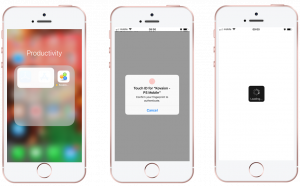
- User clicks on the native app icon
- App is secured and opened using thumb print, (native feature of mobile), provides an additional layer of security.
- Mobile apps load content faster because they store information locally
On login, displays role-based home pages/dashboards – a prominent and intuitive feature to give a seamless experience to the user. These dashboards provide a high level view of team activities, real time analysis, key metrics, pending and priority tasks etc. Refer to PeopleSoft- Fluid Dashboards | Kovaion for more information.
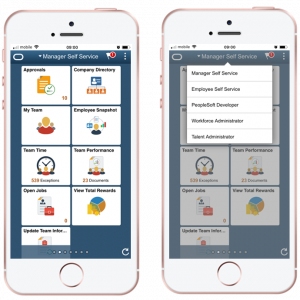
- Helps complete day to day activities such as approvals, time entry, self-service related transactions with great ease.
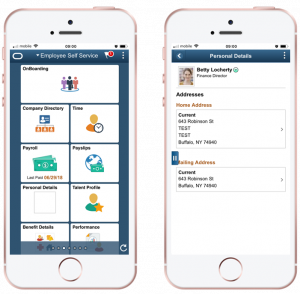
- Users can access and download documents to internal storage.
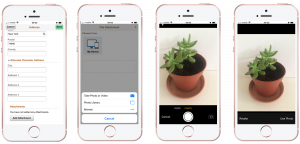
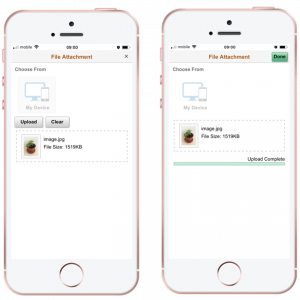
- A seamless sample transaction of user modifying his/her home address – Attachments need to be added as a part of address change. Being a mobile app -configured to provide the user with options to attach an image taken on the spot, an image from photo library, documents from the drive, document from internal memory etc.
- Native features provide an added advantage:
- Camera can be used to capture and attach information on the go
- GPS can be used to connect with maps and other services.
Pros
- In an ‘app vs website’ debate, app takes an upper hand in terms of broader reach.
- Reduced cost for implementation –
- No coding changes are required which makes maintenance and implementation much easier.
- Tools can handle PS upgrades and other new module rollouts
- Improves productivity and efficiency.
- Brand Presence – mobile apps are now considered to create a distinguished brand for each product/service. Mobile app icons work as innovative ad-banners.
- Less cluttered & Better navigation
- Push notification are received irrespective a user opens an app or not.
- Promotes product and services.
Cons
- Compatibility & Cross platform support.
- Support and maintenance – updates and compatibility fixes across operating systems.
Author: Eileen Franklin, PeopleSoft Practice